
 Free and open source · self-hosted
One command, and a computer is ready to code with AI
Hoprig is a free, open-source tool that sets a computer up for coding with Claude Code, shows every session on one page, also on your phone, and carries a session on under another account when one reaches its usage limit.
- Price
- Free
- Licence
- Apache-2.0
- Runs on
- Windows, macOS, Linux
Paste the line for your system into PowerShell (Windows) or a terminal (macOS, Linux).
irm https://raw.githubusercontent.com/allswebtech/hoprig/main/install.ps1 | iexcurl -fsSL https://raw.githubusercontent.com/allswebtech/hoprig/main/install.sh | shwget -qO- https://raw.githubusercontent.com/allswebtech/hoprig/main/install.sh | sh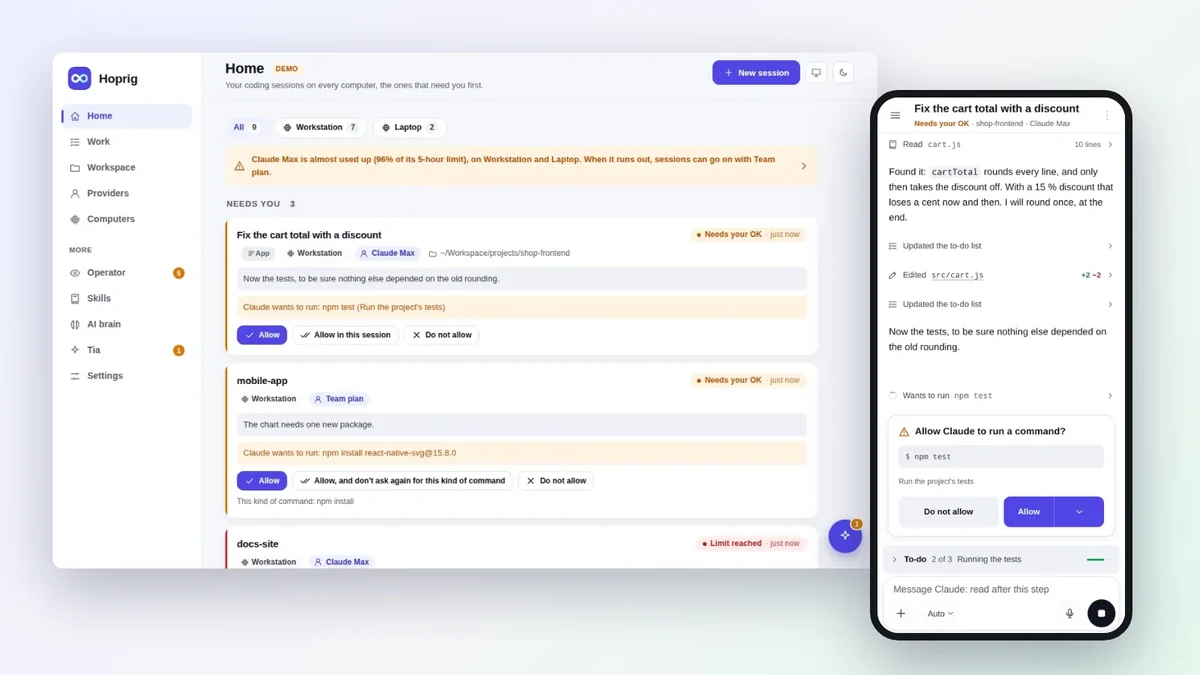
What Hoprig does
Sets the computer up
One line installs what coding with AI needs, asks nothing, and opens your browser on Hoprig, already signed in.
One AI brain
The same working rules, skills and memory, kept in one git repository and shared by your coding tools.
Carries on at a usage limit
A session belongs to its folder, not to an account. One tap, or Auto mode, moves it to another provider.
Every chat on one page
Your sessions are on one page, also in your phone's browser, with Allow and Do not allow buttons for each change.
Several computers, one place
Home PC, office PC and servers show up together. Computers behind a router connect out by themselves.
An assistant that asks first
The built-in assistant works through the dashboard. What it wants to install or restart comes to you as a card first, and so does spending money unless you allow it. It is off until you turn it on.
See it working
Real screens of the product, with demo data. Pick one to see it large.
What it works with
Coding tools
- Claude Code
- OpenCode
Your AI
- A Claude plan
- An API key
- A gateway such as TRouteAI
Where it runs
- Your own computer
- A server you add over SSH
- Your phone's browser, for the dashboard
Install it in three steps
Paste one line
Pick the line for your system and run it. It says what is missing, installs it and asks nothing.
Sign in
Your browser opens on Hoprig, already signed in. Press Sign in to Claude, or use an API key.
Start a chat
Choose New project or My own folder, say what to make, and press Allow on each change.
Just want to look? Run hoprig demo to open the dashboard with sample data: no coding tool and no account needed.
Who it is for
People who are not developers
The set-up is the wall. Hoprig installs and checks everything, then you build in a chat.
Anyone who hits the usage limit
Keep the same session going on another account instead of waiting for the reset.
People with more than one computer
The same projects, rules, skills and memory through git, and every session on one page.
How it fits with AllsWeb
- Hoprig on a cloud serverA server you rent, for example an AllsWeb cloud server, can be added over SSH and kept running, so sessions go on while your own computer is off.
- Works with TRouteAIHoprig treats a gateway as a provider. Our open-source TRouteAI is one, and it can route Claude Code to many models.
What it costs
Free
- Hoprig is open source under the Apache-2.0 licence: no fee, no trial.
- You bring your own Claude plan or API key; Hoprig does not sell AI.
- You do not need an AllsWeb account to use it.
Questions about Hoprig
Is Hoprig free?
Yes. It is open source under the Apache-2.0 licence and runs on your own computers. The AI it uses is your own Claude plan or key.
Which systems does it run on?
Windows, macOS and Linux. The install line and the test suite run on all three; Windows is newer, and the README lists what has not been tried there yet.
Do I need a Claude plan?
You need your own AI: a Claude plan, or an API key or gateway. Hoprig sets up and manages the coding tool but does not supply the AI.
What happens when I reach a usage limit?
A session belongs to its folder, not to a provider. One tap moves it to another provider or account, or Auto mode does it for you if you turn it on.
Can I use it from my phone?
Yes. The dashboard opens in your phone's browser, with a chat per project and the real terminal. At first only the computer itself can open it; you turn on phone access in Settings.
Is it affiliated with Anthropic?
No. Hoprig is made by AllsWeb. Claude and Claude Code are Anthropic's names.